Saner.ai

Write Daily Note and do Daily Reflection easily with AI


Write Daily Note and do Daily Reflection easily with AI

Daily notes and Daily reflection in minutes

Hello everyone,

We're excited to introduce our new daily note features, including the ability to quickly perform daily reflection with AI.

These tools make creating daily journals, quick notes, and gaining insights easier than ever.

Here's a step-by-step guide to help you get started.

1. Accessing Timeline Views
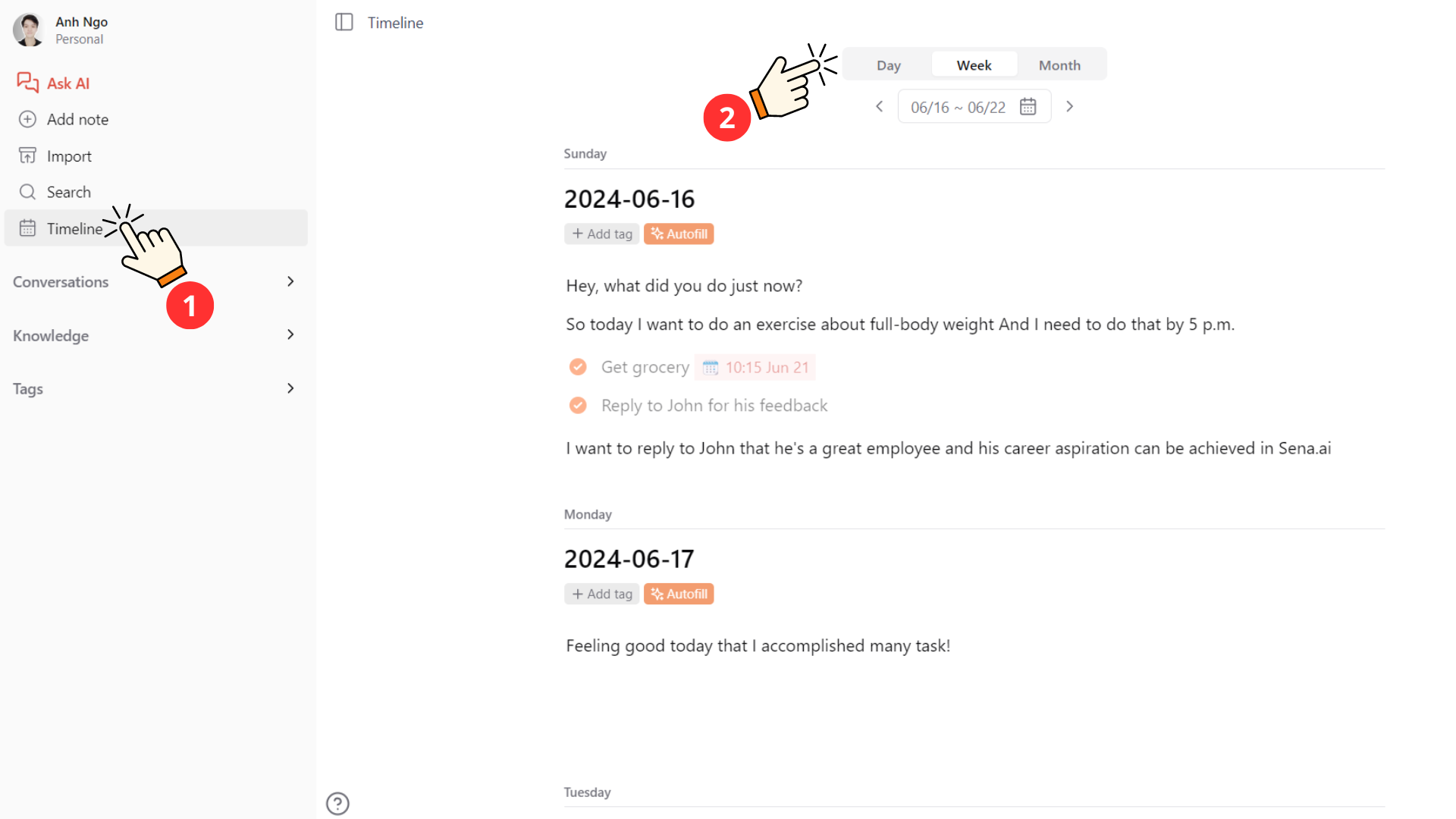
Daily note daily reflection

To begin, click on the timeline to access daily, weekly, and monthly views. Each view offers unique functionalities to help you stay organized.

Daily View

    • In the daily view, you can:
    • Add notes and tasks.
    • View notes and tasks you’ve created or spoken via our Telegram bot.

Weekly and Monthly Views

    • These views allow you to see all your notes and tasks within those timeframes, giving you a broader overview of your activities and plans.

2. Storing Daily Notes
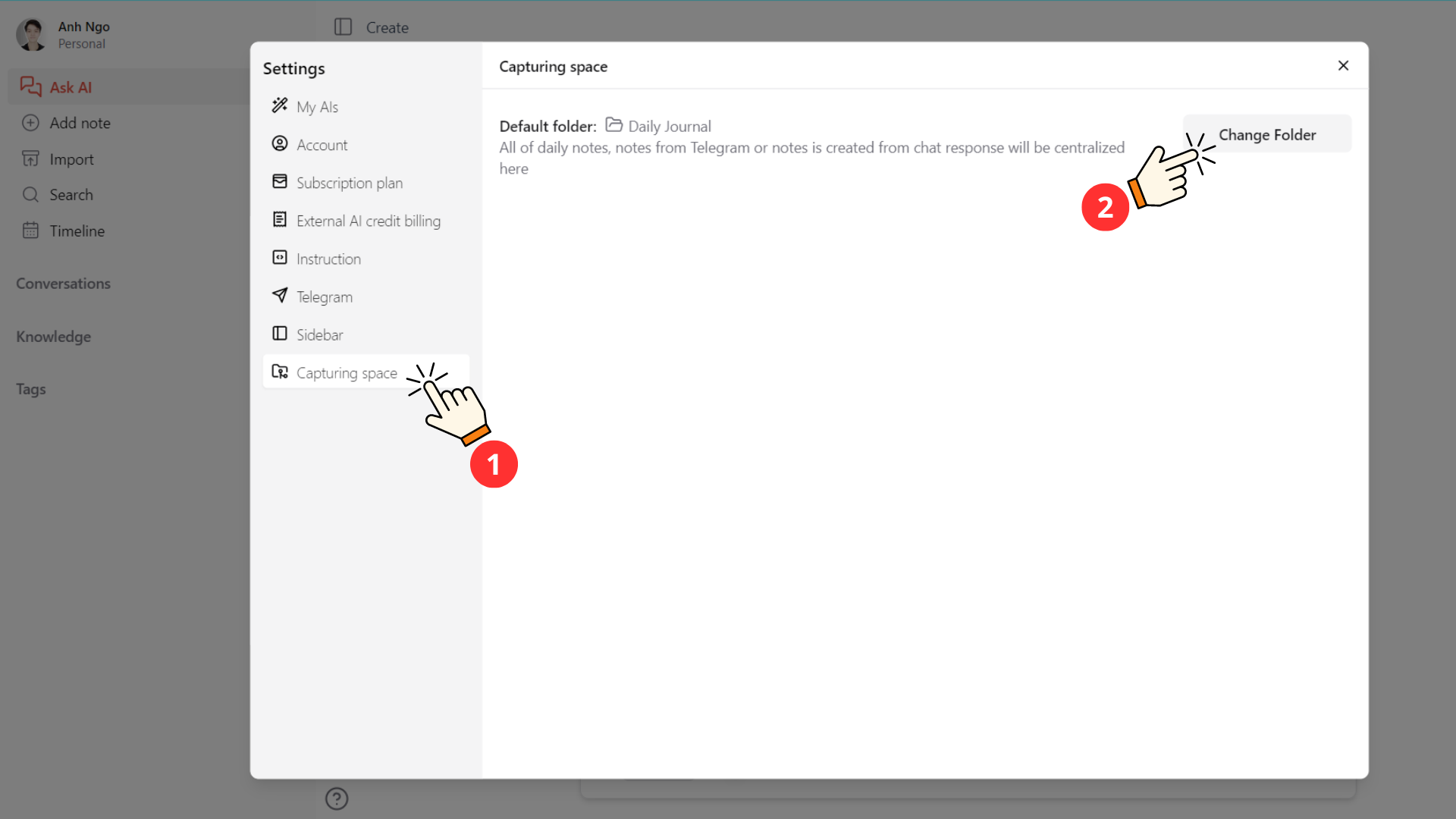
Storing daily notes

All your daily notes can be stored in a location of your choice. Here’s how to set it up:

    • Go to Settings.
    • Select "Capture Folder."
    • Choose your desired file location, such as a "Daily Journal" folder.

This ensures that all your notes are organized and easily accessible.

3. Gaining Insights from Your Notes
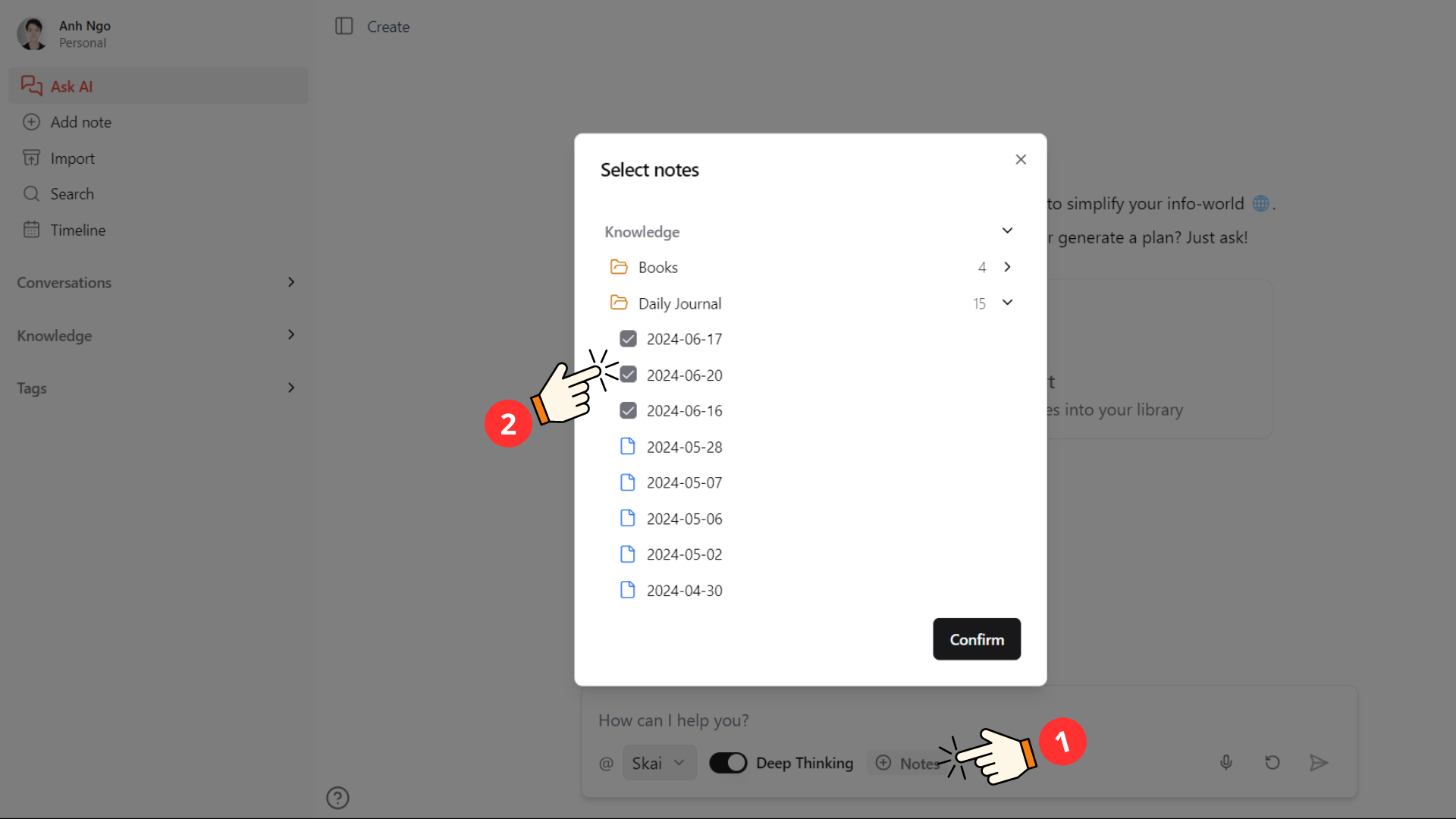
Ask AI specific files

Reflecting on your notes can provide valuable insights, but finding time for daily reflection can be challenging. Our new features make this process quicker and more efficient using AI.

How to Use AI for Daily Reflections

    • Select Notes: Choose the notes you want to reflect on in your Daily Journal folder.
    • Ask for Insights: Ask AI to analyze and provide insights from your notes.
    • Utilize Insights: Use these insights for personal reflection or create new notes from them immediately.

Whether you’re using these features for personal reflection, task management, or gaining insights, our new daily note features are designed to streamline your life and make it more straightforward.

Happy journaling!

CTA Image

Stay on top of your work and life

Try Saner.AI for free
💡
👉 You might be interested in this Full Guide to Saner.AI
Read more
Muse AI Alternatives: We tested the best 6 apps
Meta’s Muse can browse the web, create documents, monitor prices, manage reminders, and complete tasks through connected apps. That gives it broad reach, but the best personal AI assistant depends on what you actually want it to handle. Some people need help turning scattered notes and emails into a plan. Others care more about calendar management, accountability, privacy, or running custom automations. We evaluated six Muse alternatives to see where each one fits. We’ll compare how each assist
Honest Muse AI Reviews: Is Meta's Personal AI Agent worth it?
Meta shipped Muse on September 8, 2026. It books your travel, negotiates your bills, sells your car, orders your groceries, and pays for things. It lives inside its own cloud computer. It talks to you like a text thread. It keeps working after you close the app. Meta built a dedicated Linux VM for every single user, a separate gatekeeper agent called Sentinel that has to sign off on anything leaving that machine, and a bug bounty paying up to $300,000 to anyone who breaks it. Then you hit the
Honest Goblin.tools review (2026): Is this free ADHD tool enough?
I opened Goblin.tools the way most ADHD adults probably do, half-desperate and mid-spiral over a task I couldn't make myself start. I typed "clean my apartment" into the box, and thirty seconds later I had a list I could actually look at without my chest tightening. That's the pitch of Goblin.tools: nine small AI tools, all free, built by one developer who understands what it feels like when a task is too big to touch. The real question isn't whether that first moment feels like magic. It does.
Goblin.tools Alternatives: Here are the best 5 apps in 2026
When I first discovered Goblin.tools, it felt like a total revelation for my neurodivergent brain. A tool that could take a vague, paralyzing obligation like "clean the apartment" and chop it into micro-steps using AI. But the gap with Goblin.tools becomes apparent once you try to build a repeatable daily routine around it: it gives you broken-down steps, but leaves you stranded when it comes to time tracking, schedule integration, and managing your ongoing notes. The right alternative in 2026